Stock Trading Resources & Scanner Setup

Recommended Stock Scanner: Trade Ideas

Why We Use Trade Ideas

Trade Ideas provides one of the most powerful real-time stock scanning engines available today. For most traders, their lowest-tier package is more than sufficient — especially when paired with our pre-built scanner layouts.

Recommended Package

  • Blue Bundle
  • Ideal balance of performance and cost
  • Fully compatible with our Tickblaze stock workflow

🔗 Pricing & packages:
https://go.trade-ideas.com/aff_c?offer_id=6&aff_id=3758

Important Market Data Note (NASDAQ Only)

We only allow NASDAQ stocks in our stock trading environment.

When purchasing Trade Ideas:

  • You will be asked to fill out both NASDAQ and NYSE data declarations
  • You do not need NYSE data
  • You should only be billed for NASDAQ (PRO or NON-PRO)

📧 After purchase, email Trade Ideas support and clearly state:

Please bill me for NASDAQ data only. I do not require NYSE market data.

Pre-Built Stock Scanners

Finding opportunity in stocks is not about watching more charts — it’s about seeing the right stocks at the right time. Our pre-built scanners are designed to surface actionable setups across earnings, momentum, trends, reversals, and sector strength without requiring traders to build or maintain complex logic themselves. These scanners continuously filter thousands of stocks in real time, allowing traders to focus on context, confirmation, and execution, rather than hunting for ideas.

Disclaimer:  These scanners are provided for educational and informational purposes only and do not constitute trading advice or investment recommendations. All trading decisions remain the sole responsibility of the trader. Market conditions change, and no scanner or tool can guarantee results. Past performance is not indicative of future outcomes.

Step 1: Purchase Trade Ideas

Choose the Blue Bundle package.
https://go.trade-ideas.com/aff_c?offer_id=6&aff_id=3758

Step 2: Complete Data Declarations

Fill out both NASDAQ and NYSE forms if required, but remember:

  • You will only pay for NASDAQ
  • NYSE will not be activated or billed once confirmed via email
Step 3: Install Trade Ideas Software

Download and install the platform:
https://www.trade-ideas.com/download/

Step 4: Install Our Pre-Built Scanner Layouts

We’ve already built optimized scanner layouts for you.

Install the Trade Ideas Cloud Link layouts here:
https://www.trade-ideas.com/Cloud.html?code=beff342838e7fd83a90ab8dd082ba301

➡️ Copy the Cloud Link
➡️ Paste it directly into Trade Ideas

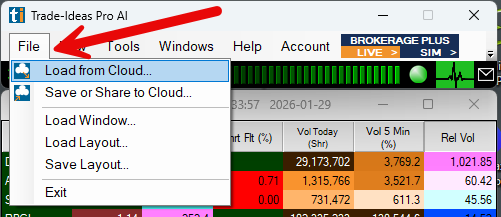
1) Copy From Cloud

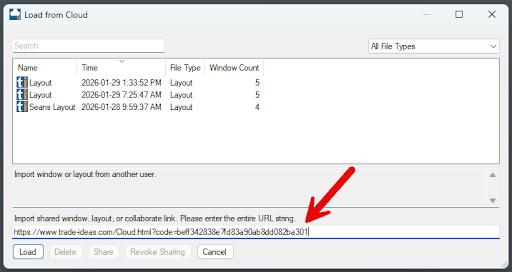
2) Copy Cloud Link Here and Paste into TI

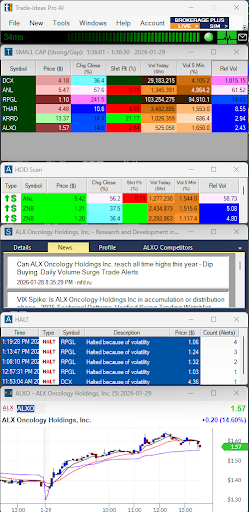
3) The FInal Layout Should Looks Like This

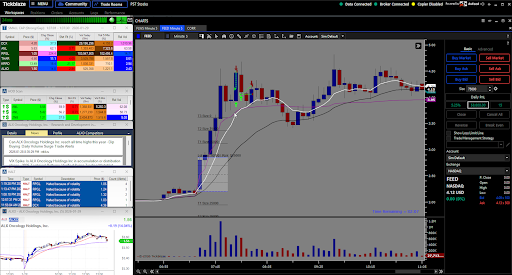
4) When Loaded In Conjunction With Tickblaze It Can Look Like This

Affiliate & Liability Disclaimer:

Some links on this page may be affiliate links. This means we may earn a commission if you choose to purchase through them, at no additional cost to you.

We are not responsible for third-party software, services, billing, data fees, outages, or support. All third-party products are owned, operated, and supported by their respective companies. Our role is strictly to recommend tools we actively use and provide optional integration guidance.

Always review third-party terms, data agreements, and pricing details before purchasing.

🔥 50% OFF Instant Gladiators || Code: 50GLAD
X