
Resets
Everything you need to know about account resets, benchmark preservation, and getting back on track.
Note: Benchmark Reset and Preserve Drawdown are available on Stocks Gladiator Accounts only. All Gladiator Futures Accounts (new and existing) use Standard Reset only. In the Sprint program, only Evaluations can be reset; Sprint payout accounts cannot be reset.
Why Reset with Us?
- Benchmark Reset (Stocks Only)
- Save your benchmark, save your progress
- Don't let one bad day derail your progress
- We understand trading is hard — resetting shouldn't set you back
- Keep what you've earned — your benchmarks, your account, your chance at a career
- We don't penalize for one-offs
- You don't have to start over
- Drawdown Reset
- Keep your place above the drawdown threshold
- No need to clear the drawdown and start all over
- Start with profits in the account — move right to earning your first benchmark
Standard vs Benchmark Reset
| Feature | Standard Reset | Benchmark Reset |
|---|---|---|
| Starting Balance | Initial account balance | Initial account balance |
| Benchmark Progress | Reset to 0 (Level 1) | Up to 4 Benchmarks restored |
| Drawdown Type | Intraday / EOD Trailing | Intraday / EOD Trailing |
| Cost | Baseline fee | Tiered fee (based on Benchmarks) |
| Drawdown Preservation | Not available | Optional add-on |
- Preserve Drawdown Balance Add-On (Stocks Only)
Available only with a Benchmark Reset. The new account starts with a higher initial balance so the trailing drawdown is already covered, allowing the trader to focus directly on Daily (Intraday accounts) and Weekly (Swing accounts) Profit Targets and Benchmarks.
- Starting Balances with Preservation
12.5K
25K
50K
Reset Pricing for Futures Accounts
Standard reset only. No benchmark reset, no drawdown preservation. Account restarts from Benchmark 0 with full default drawdown.
| Account Size | Reset Price |
|---|---|
| 12.5K / 25K Light Futures (Intraday Trailing, EOD, & Swing) | $150 |
| 50K Light Futures (Intraday Trailing & EOD) | $250 |
| 25K Forge (Intraday DD & EOD DD) | $225 |
| 50K Forge (Intraday DD & EOD DD) | $350 |
| 25K Sprint Evaluation (EOD DD) | $65 |
| 50K Sprint Evaluation (EOD DD | $100 |
| Sprint Payout accounts | Reset not available |
Reset Pricing – Stock Accounts
Tiered Benchmark Reset pricing with optional Drawdown Preservation Add-on. Stock accounts only.
| Benchmarks | ||||||
|---|---|---|---|---|---|---|
| Account Size | Standard Reset | 1 | 2 | 3 | 4 | Preserve Draw-down Add-on |
| 25K Stocks | $100 | $120 | $180 | $240 | $300 | $200 |
| 50K Stocks | $200 | $240 | $360 | $480 | $600 | $400 |
Failure, Eligibility & Limits
- When does an account fail?
- Failure timing
If an account fails during the day (e.g. 12:00 PM EST), trading is halted but the failure email is sent at the 6:00 PM EST End of Day report. Until then, the account cannot be reset.
- When does the reset become available?
- Lifetime reset limit
Each Gladiator account can be reset a maximum of 10 times over its entire lifetime. Once reached, it must be replaced with a new account purchase.
- Reset Eligibility
A reset is available on the My Purchases page if:
- The trader has not exceeded the active account limits.
20 Max accounts per trader – Futures (Payout) + Stocks (Signing bonus) accounts. Sprint Evaluation accounts are unlimited and don’t count toward this limit.
- Futures – 10 payout accounts total, in any combination of:
- Gladiator Light
- Gladiator Forge
- Gladiator Sprint
- Sprint Evaluations: unlimited – uncapped, not counted; a passed eval beyond the 10-cap waits in Reserve until a slot frees up.
- Stocks — 10 accounts total
- Maximum 5 Intraday accounts
- Maximum 5 Swing accounts
- The reset request is initiated within 48 hours of the EOD report confirming the failure.
The number beside the Reset button shows the number of resets already done on the account.
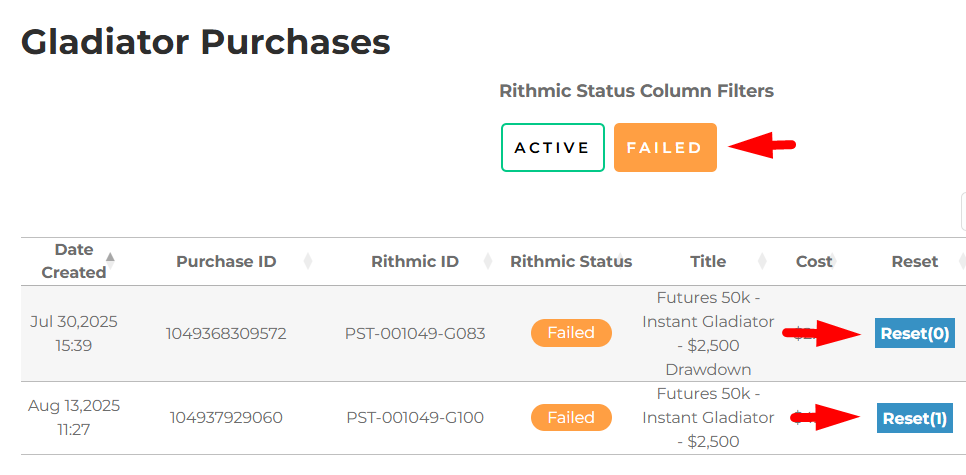
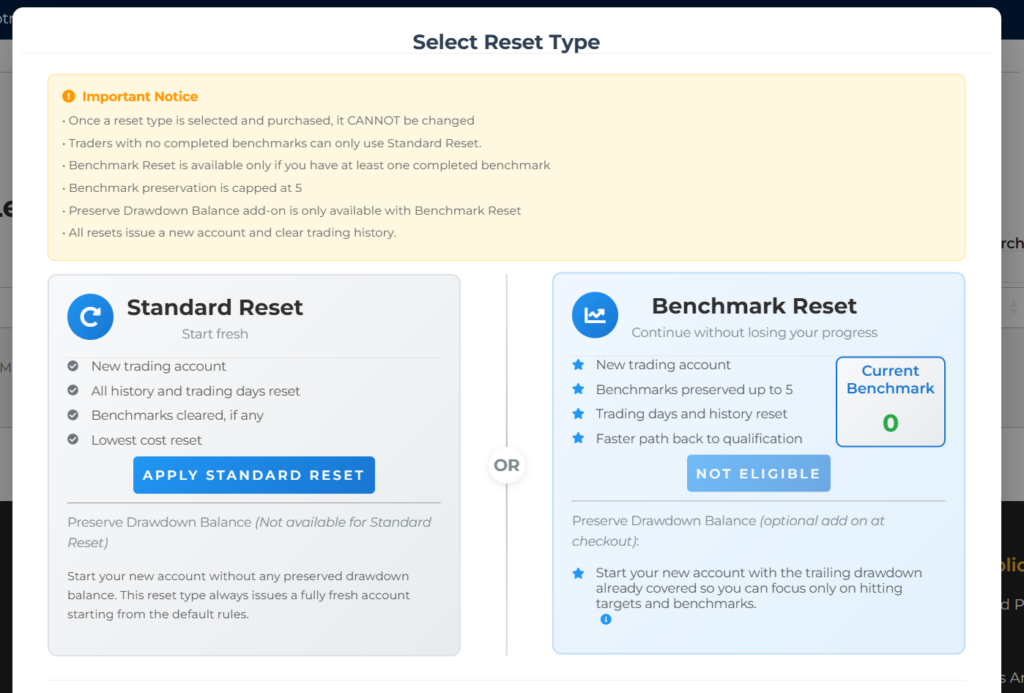
Reset options on My Purchases page
For Gladiator Futures Accounts purchased before April 23, 2026, the Benchmark Reset and Preserve Drawdown options are no longer available. If the account fails, the trader’s reset option is a Standard Reset, which produces a new Gladiator Futures (Light Payout Account) at the new pricing and parameters.
For new Gladiator Futures (Payout Account) products — including both Light and Forge sub-types — failed accounts can be reset using the Standard Reset option within 48 hours of the EOD failure report only (Benchmark Reset and Drawdown Preservation are not available on these accounts).
For Gladiator Sprint, only the Evaluation phase is resettable: a failed Sprint Evaluation can be reset using the Standard Reset option within 48 hours of the EOD failure report. Sprint PTSA (Payout Account) accounts cannot be reset. Benchmark Reset and Drawdown Preservation are not available on Sprint accounts.
Stocks Accounts retain all reset options.
Preservation Rules
| Benchmarks Before Failure | Preserved Count | Notes |
|---|---|---|
| 0 | N/A | Preserve option not available |
| 1 | 1 | Next earned becomes 2nd |
| 3 | 3 | Next earned becomes 4th |
| 4 | 4 | Next earned becomes 5th |
| 5 | 4 (cap) | Preservation capped at 4. Next earned becomes 5th |
| 6 | 4 (cap) | Can only preserve up to 4. Next earned becomes 5th |
| 8 | 4 (cap) | Can only preserve up to 4. Next earned becomes 5th |
Preservation cap: Maximum of 4 Benchmarks can be preserved regardless of how many were earned.
How Progression Resumes
| Example | Benchmarks Before Failure | Preserved | Next Benchmark |
|---|---|---|---|
| A | 4 | 4 | 5th |
| B | 6 | 4 | 5th (starts from preserved 4) |
| C | 1 | 1 | 2nd |