
1. Core Definitions #
To ensure complete clarity for our traders and automated systems, the following terms are defined as:
- Benchmark: A specific milestone achieved by completing a 5-day trading cycle.
- Daily Profit Target: The minimum net profit required in a single trading day to be counted as a trading day.
- MAE (Max Adverse Excursion) Flag: A risk violation triggered when a trade’s unrealized loss exceeds the account’s defined limit of 50% of account’s initial drawdown.
- Trailing Drawdown: A dynamic loss limit that follows the highest unrealized account balance (for Intraday Drawdown Accounts) or End of Day closing balance (for EOD drawdown accounts).
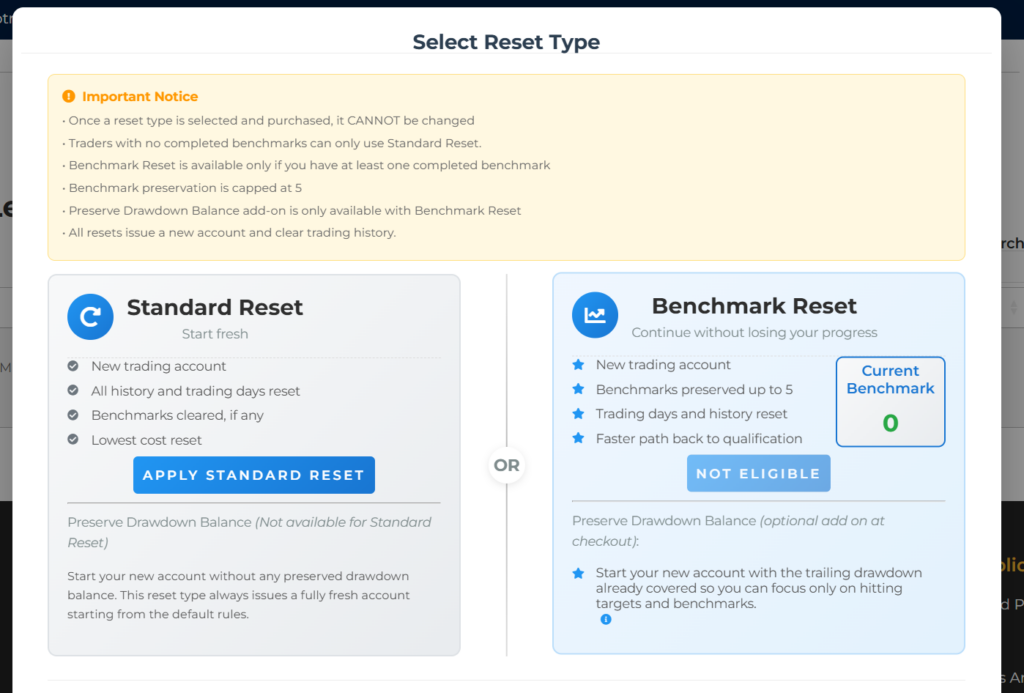
- Standard Reset (Option 1)
Issues a new trading account with no preserved Benchmarks. All balances, trading days, and history are reset to their normal starting state. - Benchmark Reset (Option 2)
Issues a new trading account with up to 4 previously earned Benchmarks carried over. Balances, trading days, and history reset to the normal starting state.- Benchmark Reset Add On: Preserve Drawdown Balance
Available only with a Benchmark Reset.
The new account starts with a higher initial balance so the trailing drawdown is already covered, allowing the trader to focus directly on Daily Profit Targets and Benchmarks without needing to rebuild the drawdown first.
- Benchmark Reset Add On: Preserve Drawdown Balance
2. Failure & Reset Limits #
When an account fails:
- An account is considered failed when it breaches its drawdown or gets 3 MAE flags.
- If an account fails during the trading day, for example at 12:00 p.m. EST, the failure prevents you from taking further trades but a failure email is sent when the End of Day report is generated at 6:00 p.m. EST.
- Until the End of Day report runs, the account cannot be reset. This applies to every trader and every account.
When a reset becomes available:
- If an account fails during the day, the reset option becomes available only after the 6:00 p.m. EST End of Day report.
- In practice, this means the trader can reset the account starting the next day. There is no way to reset an account immediately after an intraday failure.
Gladiator and Instant Gladiator reset limit:
- Each Gladiator or Instant Gladiator account can be reset a maximum of 10 times over its entire lifetime. This is a hard limit.
- Once an account reaches 10 total resets, it can never be reset again and must be replaced with a new account purchase.
What a reset does: A reset issues a new trading account with the same size and drawdown.
3. Evaluation Account – Gladiator Phase #
What if I fail my account? Can I reset and continue?
This depends on your account type. Please note the decommissioning of the Warrior program.
| Account Type | Reset Eligibility | Logic & Requirements |
| Warrior (Removed) | Ineligible | All Warrior accounts were decommissioned by January 16, 2026. No resets or renewals are possible. |
| Gladiator | Eligible | May be reset via Standard or Benchmark reset options within 48 hours of failure. |
Important Note on Subscriptions: Gladiator accounts are not subscription-based. There is no monthly rebilling. Once an account fails, it remains inactive until a manual reset is purchased by the trader.
4. Gladiator Failure & Reset Procedures #
If an account triggers 3 MAE Flags or breaches the Trailing Drawdown, it enters a “Failed” status.
The trader then enters a 48-hour reset window.
Reset Eligibility #
A reset is only available on the My Purchases page and click the Reset button beside the account you wish to reset if the following deterministic conditions are met:
- Condition 1: The trader has fewer than 5 active accounts total.
- Condition 2: The reset request is initiated within 48 hours of the End-of-Day (EOD) report confirming the failure.
Reset Option After Failure Comparison #
| Feature | Option 1: Standard Reset | Option 2: Benchmark Reset |
|---|---|---|
| Starting Balance | Initial account balance | Initial account balance |
| Benchmark Progress | Reset to 0 (Level 1) | Up to 4 Benchmarks restored |
| Drawdown Type | Trailing / EOD | Trailing / EOD Optional Drawdown Preservation Add on Available only with a Benchmark Reset. The new account starts with a higher initial balance so the trailing drawdown is already covered, allowing the trader to focus directly on Daily Profit Targets and Benchmarks.
|
| Cost | Baseline fee | Tiered fee (based on Benchmarks) |
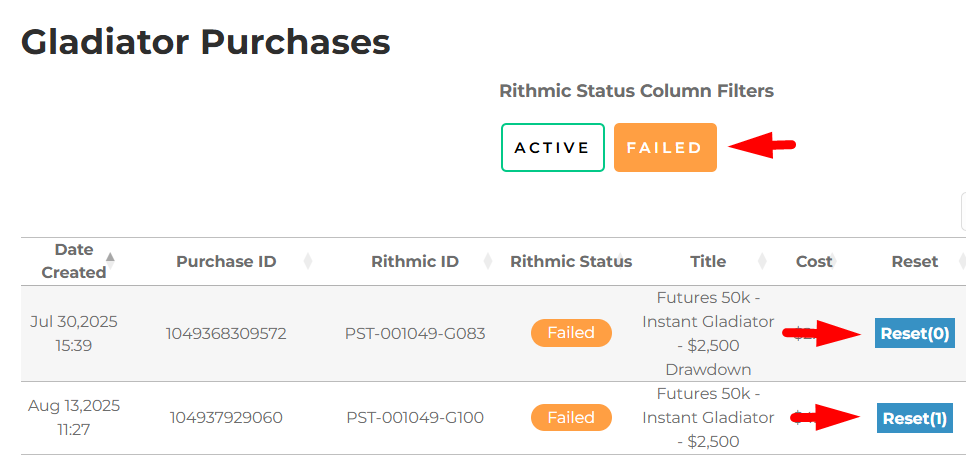
The number beside the Reset button shows the number of resets already done on the account.
Benchmark Preservation Rules and Scenarios #
Preservation cap #
| Benchmarks achieved before failure | If trader chooses preserve option | Resulting preserved count |
| 0 | Option to preserve benchmarks and preserving drawdown balance add-on is not available | N/A |
| 1 to 4 | Preserve benchmarks up to achieved count | 1 to 4 |
| 6 | Can only preserve up to 4 | 4 |
| 8 | Can only preserve up to 4 | 4 |
How progression resumes (examples) #
| Example | Benchmarks before failure | Trader picks preserve reset | What benchmark is next |
| A | 4 | Preserves 4 | Next benchmark earned becomes 5th |
| B | 6 | Preserves only 4 | Next benchmark earned becomes 5th (trader starts from preserved 4) |
| C | 1 | Preserves 1 | Next benchmark earned becomes 2nd |
Will I receive a new contract when I reset? #
No. Resets do not require a new contract. Your original Gladiator contract terms automatically apply to all reset accounts linked by your Subscription ID, User ID, or Email Address.
5. Platform & Data Access #
Do I retain access to Tickblaze and market data after failing my account?
Access is strictly tied to the presence of an Active account on your profile.
- Active Account (Status: Normal): Access to Tickblaze and Rithmic market data is maintained.
- Failed Account (Status: Breached): Access is suspended. If a trader performs a Reset (Option 1 or 2), access is restored with the new account.
- Market Data Renewals: Level 2 data is valid for the current calendar month only. It must be repurchased at the start of each month, regardless of account status.